> For the complete documentation index, see [llms.txt](https://docs.servoy.com/llms.txt). Markdown versions of documentation pages are available by appending `.md` to page URLs; this page is available as [Markdown](https://docs.servoy.com/reference/servoy-cloud/cloud-control-center/application-overview/repositories/pull-requests.md).
# Pull Requests
Reference documentation for pull requests in the Cloud Control Center
{% hint style="info" %}
Pull requests are currently in closed beta. Production rollout follows in a future release.
{% endhint %}
## Overview
The **Pull Requests** feature in the Cloud Control Center provides a full code review workflow directly within the platform. You can create, review, approve, and merge pull requests without switching to an external Git interface.
Pull requests are accessible from **Code Repositories** — select a repository to see its open PRs.
### Activity types
The conversation timeline can include:
* **Comments** — general discussion or inline comments on specific lines
* **Tasks** — checklist items (TODO/Done) within comments
* **Reviews** — approvals or disapprovals from reviewers
* **Status changes** — reopened, moved to draft, merged, source branch deleted
## PR List
Each repository shows its open pull requests with the following details:
* **Title** — the PR title, often linked to a ticket key
* **Author** — who created the pull request
* **Source and target branch** — which branches are involved
* **Reviewer status** — approval state per reviewer (Pending, Approved, or Disapproved)
* **Comment count** — number of comments in the conversation
* **Status** — Open, Draft, Merged, or Rejected
Use the status filter tabs to quickly switch between Open, Merged, and Rejected pull requests.
## Create Pull Request
To create a new pull request:
1. Navigate to **Code Repositories** and select your repository
2. Click **New pull request**
3. Select the **source branch** (your feature branch)
4. Select the **target branch** (e.g., `master` or `main`) — a default target branch can be configured by administrators
5. Enter a **title** for the pull request
6. Optionally add a **description**
7. Select **reviewers** from the team members in your namespace
8. Click **Create** to submit, or save as **Draft** to avoid notifying reviewers prematurely
## Review and Merge
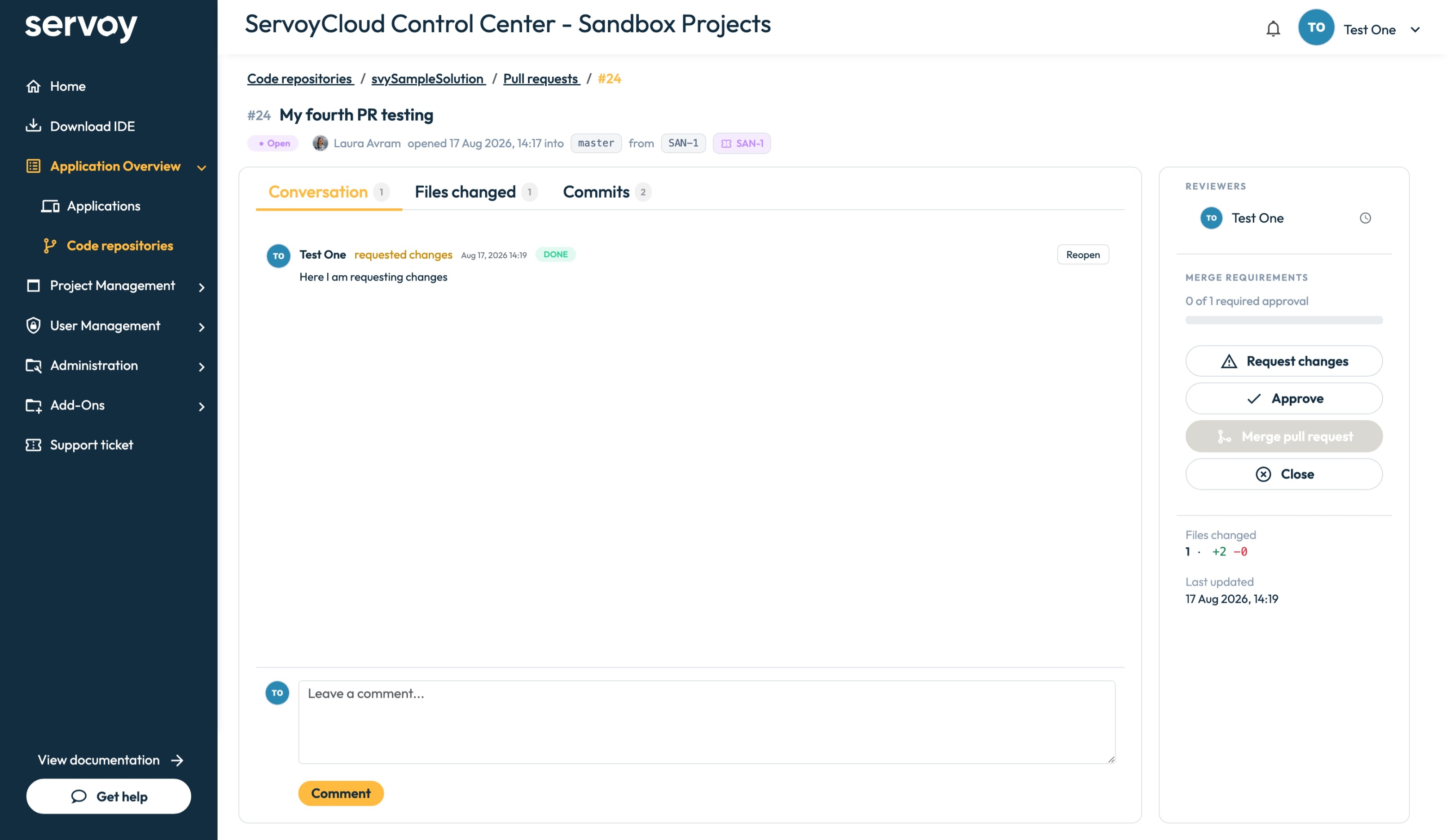
Open a pull request to see the detail view. It has three tabs:
* **Conversation** — the full timeline of comments, reviews, and status changes
* **Files changed** — the diff of all modified files with inline commenting
* **Commits** — the list of commits included in the pull request
The sidebar shows:
* **Reviewers** — assigned reviewers and their review status (Pending, Approved, or Disapproved)
* **Merge Requirements** — which conditions must be satisfied before merging (e.g., "0 of 1 required approvals")
* **Linked ticket** — the project management ticket linked to this PR (e.g., SAN-1)
* **Actions** — Approve, Request changes, Merge pull request, or Close
Pull request conversation view
### Merge Requirements
Before a pull request can be merged, it must satisfy the configured merge policies. The merge button is disabled until all requirements are met. Requirements are displayed in the sidebar of the PR detail view.
## Merge Policies
Administrators can configure merge policies under **Administration > Settings > Code Repositories**:
* **Required approvals** — minimum number of approvals before a PR can be merged (default: 0)
* **Prevent author self-approval** — prevent authors from approving their own pull request
* **Default merge strategy** — Squash, Merge commit, or Rebase
* **Default target branch** — the branch PRs target by default (configured per repository)
## Commit History
Browse the commit history per branch from Code Repositories. Click any commit to see a full unified diff per file. Commits linked to a pull request show the PR reference in the commit list.
---
# Agent Instructions
This documentation is published with GitBook. GitBook is the documentation platform designed so that both humans and AI agents can read, navigate, and reason over technical content effectively. Learn more at gitbook.com.
## Querying This Documentation
If you need additional information that is not directly available in this page, you can query the documentation dynamically by asking a question.
Perform an HTTP GET request on the current page URL with the `ask` query parameter, and the optional `goal` query parameter:
```
GET https://docs.servoy.com/reference/servoy-cloud/cloud-control-center/application-overview/repositories/pull-requests.md?ask=&goal=
```
`ask` is the immediate question: it should be specific, self-contained, and written in natural language.
`goal` is optional and describes the broader end goal you are ultimately trying to accomplish on behalf of the user. GitBook uses it to tailor the answer towards what is most useful for that goal.
The response will contain a direct answer to the question and relevant excerpts and sources from the documentation.
Use this mechanism when the answer is not explicitly present in the current page, you need clarification or additional context, or you want to retrieve related documentation sections.