> For the complete documentation index, see [llms.txt](https://docs.servoy.com/llms.txt). Markdown versions of documentation pages are available by appending `.md` to page URLs; this page is available as [Markdown](https://docs.servoy.com/reference/servoy-developer/object-editors/theme-editor/brand-color-properties.md).
# Brand colors Properties
Reference documentation for Servoy Theme Brand colors Properties
## Overview
Brand colors Properties
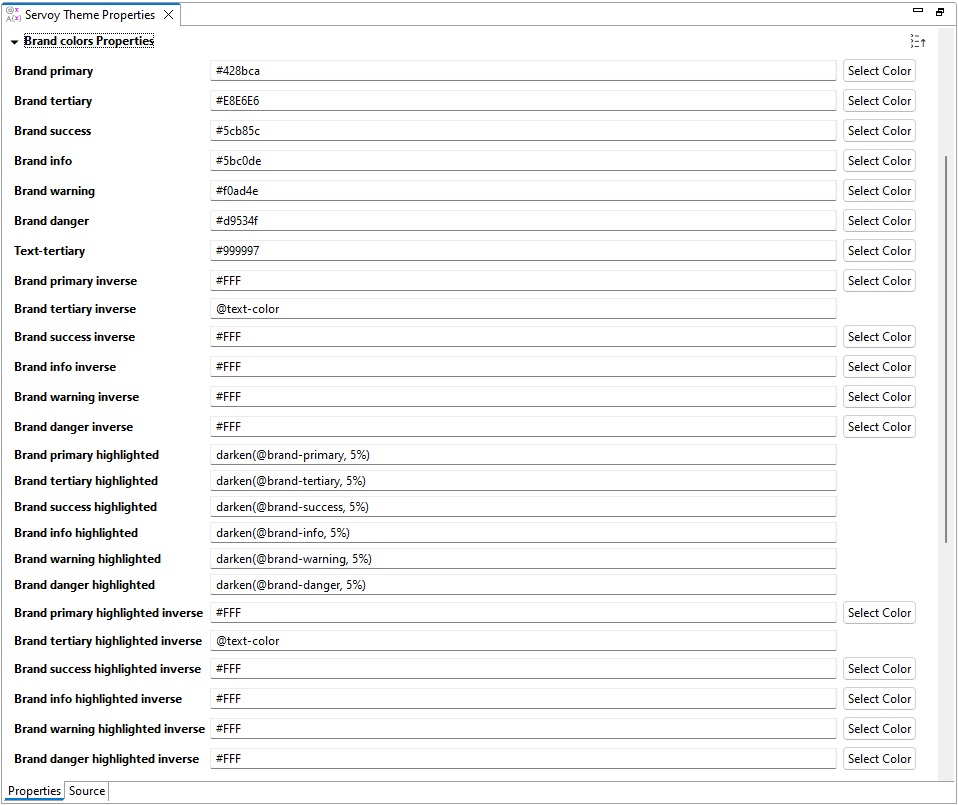
The **Brand colors Properties** defines the various color settings associated with the brand identity of the application. These colors are used to maintain consistency and ensure that the application adheres to the visual guidelines of the brand.
## Properties
{% hint style="info" %}
Some properties have an additional button: `Select Color`, which opens the [color chooser](/reference/servoy-developer/object-editors/color-chooser.md) wizard.
{% endhint %}
Here's an in-depth look at each property:
### Brand primary
This is the main color used to represent the brand. It is often used for primary buttons, links, and other key elements.\
Value: Hex color code (e.g., `#428bca`).
### Brand tertiary
This is a secondary color that complements the primary brand color. It’s used for secondary actions or less prominent elements.\
Value: Hex color code (e.g., `#E8E6E6`).
### Brand success
This color is used to indicate success or positive action. Commonly used for success messages, validation highlights, or positive indicators.\
Value: Hex color code (e.g., `#5bc85c`).
### Brand info
Used for informational messages or icons, providing a neutral tone that stands out from the primary and secondary colors.\
Value: Hex color code (e.g., `#5bc0de`).
### Brand warning
Indicates warnings or cautionary messages. It’s typically used to draw attention to potential issues that require user attention.\
Value: Hex color code (e.g., `#f0ad4e`).
### Brand danger
This color is used for error messages or destructive actions, such as deletions or critical errors.\
Value: Hex color code (e.g., `#d9534f`).
### Text-tertiary
This is the color used for less prominent text, often for placeholders or secondary information.\
Value: Hex color code (e.g., `#999999`).
### Brand primary inverse
The inverse color of the primary brand color, used for text or elements that appear on a background of the primary brand color.\
Value: Hex color code (e.g., `#FFF`).
### Brand tertiary inverse
The inverse color of the tertiary brand color, ensuring readability against tertiary-colored backgrounds.\
Value: Hex color code (e.g., `@text-color`).
### Brand success inverse
The inverse color of the success color, used for text or icons on success-colored backgrounds.\
Value: Hex color code (e.g., `#FFF`).
### Brand info inverse
The inverse color of the informational color.\
Value: Hex color code (e.g., `#FFF`).
### Brand warning inverse
The inverse color for warning messages, ensuring text or icons are readable on a warning background.\
Value: Hex color code (e.g., `#FFF`).
### Brand danger inverse
The inverse color of the danger color, ensuring readability on error backgrounds.\
Value: Hex color code (e.g., `#FFF`).
### Brand primary highlighted
A slightly darker version of the primary brand color, used to highlight active or focused elements.\
Value: Derived using a function like `darken(@brand-primary, 5%)`.
### Brand tertiary highlighted
A darker version of the tertiary color for highlighting purposes.\
Value: Derived using a function like `darken(@brand-tertiary, 5%)`.
### Brand success highlighted
A darker shade of the success color used for emphasis on success-related elements.\
Value: Derived using a function like `darken(@brand-success, 5%)`.
### Brand info highlighted
A darker shade of the informational color for highlighting informational elements.\
Value: Derived using a function like `darken(@brand-info, 5%)`.
### Brand warning highlighted
A darker version of the warning color for emphasis.\
Value: Derived using a function like `darken(@brand-warning, 5%)`.
### Brand danger highlighted
A darker shade of the danger color, used for emphasizing critical or dangerous actions.\
Value: Derived using a function like `darken(@brand-danger, 5%)`.
### Brand primary highlighted inverse
The inverse color of the highlighted primary brand color.\
Value: Hex color code (e.g., `#FFF`).
### Brand tertiary highlighted inverse
The inverse color of the highlighted tertiary brand color.\
Value: Hex color code (e.g., `@text-color`).
### Brand success highlighted inverse
The inverse color of the highlighted success color.\
Value: Hex color code (e.g., `#FFF`).
### Brand info highlighted inverse
The inverse color of the highlighted informational color.\
Value: Hex color code (e.g., `#FFF`).
### Brand warning highlighted inverse
The inverse color of the highlighted warning color.\
Value: Hex color code (e.g., `#FFF`).
### Brand danger highlighted inverse
The inverse color of the highlighted danger color.\
Value: Hex color code (e.g., `#FFF`).
---
# Agent Instructions
This documentation is published with GitBook. GitBook is the documentation platform designed so that both humans and AI agents can read, navigate, and reason over technical content effectively. Learn more at gitbook.com.
## Querying This Documentation
If you need additional information that is not directly available in this page, you can query the documentation by asking a question.
Perform an HTTP GET request on the following URL with the `ask` and `goal` query parameters:
```
GET https://docs.servoy.com/reference/servoy-developer/object-editors/theme-editor/brand-color-properties.md?ask=&goal=
```
`ask` is the immediate question: it should be specific, self-contained, and written in natural language.
`goal` is what the user is ultimately trying to achieve, the reason they need the answer. Sharing it helps GitBook give you a better, more relevant answer. A goal is most helpful when it describes the outcome the user wants rather than restating the question. For example, with `ask=how do I create an API token`, a goal like `automate deployments from our CI pipeline` lets GitBook tailor the answer to that use case.
The response will contain a direct answer to the question and relevant excerpts and sources from the documentation.
Use this mechanism when the answer is not explicitly present in the current page, you need clarification or additional context, or you want to retrieve related documentation sections.